Using Segment Data to Document Your Ancestors

Where do you go after you’ve identified a genetic network of matches and figured out how they match you? You document what you’ve learned. One way to document what you’ve learned is by capturing the segment data, the actual places where you and your match share DNA. The news that MyHeritage is going to stop allowing raw DNA uploads is a disappointment since that has been my preferred place for downloading segment data. Leah Larkin explains the possible reasons for this change of process at MyHeritage here, and they certainly make sense. The ease of transferring a DNA data file from Ancestry to MyHeritage was a motivation for many to use MyHeritage. In the future, customers will need to purchase a MyHeritage DNA test to be represented in the database. Two other companies, FamilyTreeDNA and Living DNA still accept uploads and have a chromosome browser, as does the third party website GEDmatch. 23andMe had a chromosome browser before the data breach in 2023. With new owners buying the bankrupt company, the future of 23andMe’s database and functionality is anyone’s guess.

As a reminder of the value of segment data, I have an example from my own research that might entice you to make sure your DNA is on a site with a chromosome browser and that you are familiar with the amazing things you can do at DNA Painter.

In a prior post I wrote about the lure of small DNA segments and you can find another example there.

To dive deep into segment data, the person to know is Jim Bartlett. He writes extensively about segments on his blog, Segmentology, and entries like this one are good places to start. Roberta Estes has organized her information about segment triangulation (when three people all share the same segment) here. Kitty Cooper is another blogger with extensive experience with segment data.

Here’s a DNA Painting of my maternal chromosome 14. The entire chromosome has been painted with the DNA from my two maternal great-grandparent couples, one in pink and one in yellow. You can see where the DNA from my mother crossed over from her paternal side (yellow) to the maternal side (pink). For more about recombination, see this video.

Screenshot from a privatized chromsome painting of Chromosome 14 at DNA Painter

In order to create the DNA painting, I downloaded the segment data from different websites (you will see them labeled: 23andMe and MyHeritage for this particular chromosome) and then uploaded the segment data to DNA Painter. I assigned each segment an ancestor and a corresponding colour. The pink represents my maternal-maternal great-grandparents, Malcolm Argul Pike and Martha Edna (Greer) Pike. I labelled the matches with the relationship (1C1R for first cousin once removed, etc.) These are my cousins KSGM, ADJ, BH, and PP. The yellow segment is a 1C1R who descends from my maternal-paternal great-grandparents, Winfield Scott Johnson and Lillie May Key.

The diagram below of the maternal side of my family tree has been colour-coded to match the DNA painting above.
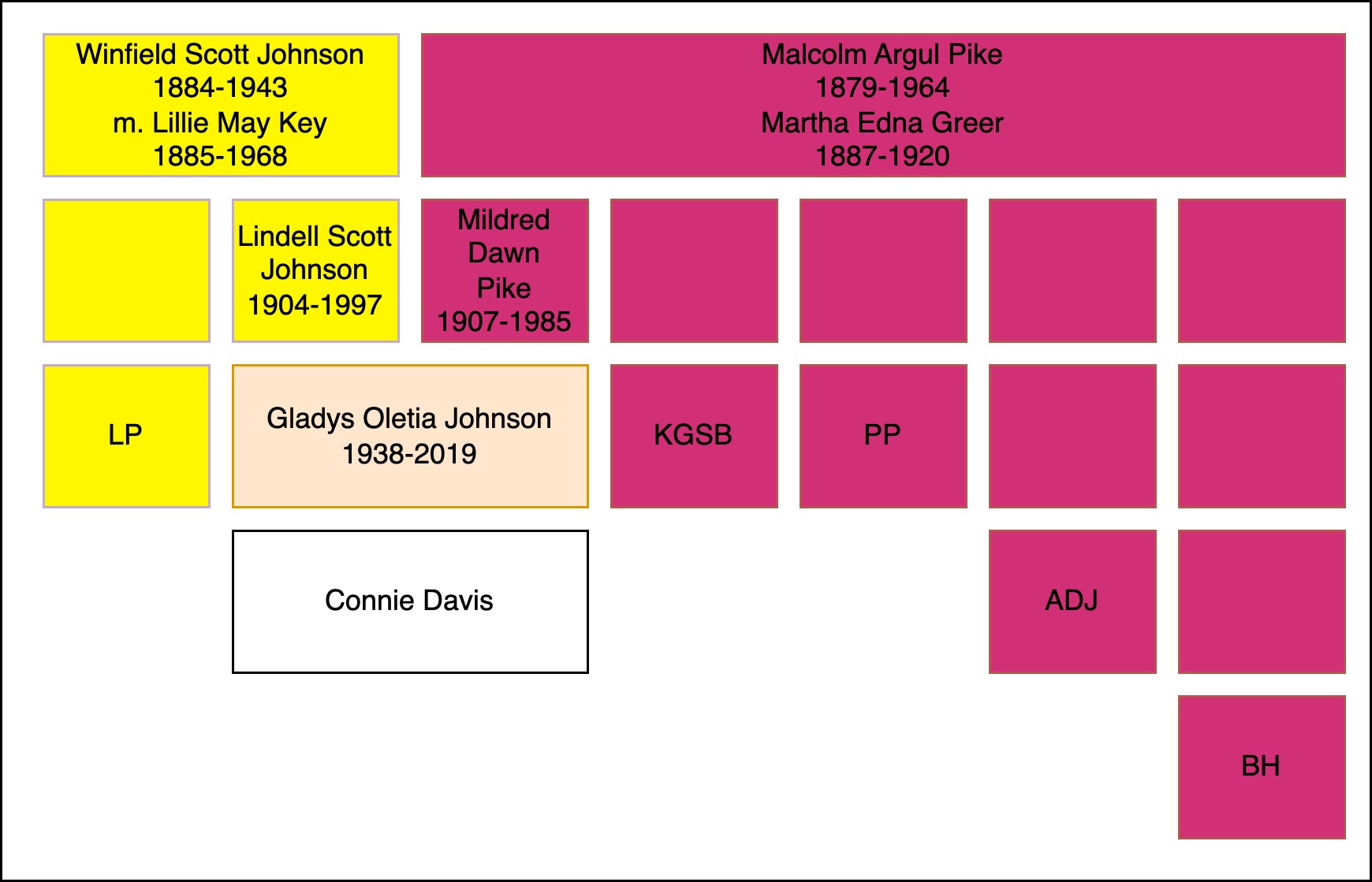
Family diagram showing my maternal great-grandparents and DNA matches from each of them.

I have now documented my great-grandparents for my maternal chromosome 14. I’m creating a catalogued library of my DNA data. Any matches with segment data can easily be identified by great-grandparent. And as a reminder – matches to great-grandparents are special. You always receive DNA from your great-grandparents!

I hope this example will inspire you to make sure your own DNA is at a website or websites where you can access a chromosome browser and that you have other cousins who do the same. In the long run, this type of analysis will help us all identify our ancestors.

A Treasure in the Tax Book

The tax records from Fayette County Georgia for the years 1833-1851 are in rough shape. The years 1839 and 1840 seem to be bound in the December 13, 1836 edition of the Southern Reporter, published in Milledgville. And tucked into the back of the 1840 tax records, this poem appears in a hand different than William Sparkman, the tax assessor. [Spelling preserved from the original.]

Our Taxes increase so Evry Year
We Surely cannot pay
For we are getting in debt tis clear
And have to move away
Unless we get our Martin Van
To rule our nation right
He will do justice to every man
And Keep his ends in sight

That good Old William Henry H.
Who fought at Tippacanoe
Will Beat our Van in Spite of fate
& inspite of all we can doe
But God will not suffer man to fall
Who lives by his hard labour
But at the Judgement day h__ call
For our Whig friends & Neighbours
A[nd] Say depart ye – – I know you not
T. Slick

Section of poem found in tax book for the year 1840 in Fayette County, Georgia.

A brief dive into history finds that President Martin Van Buren maintained the austere government policies of his predecessor, deepening the financial crisis in 1837. And during that time he continued to live a wealthy lifestyle in the White House, staffed by both free people of color and enslaved people. William Henry Harrison, a hero from a battle in Indiana against the Native people living there, defeated him in the election of 1840.

This little treasure scribbled onto a page in the back of a tax book provides a glimpse into the feelings of the citizens of Georgia in 1840. Take a look for yourself, the tax records are available online at FamilySearch.

WikiTree Has a New Look!

Over the past year, a team of paid consultants and volunteer developers at WikiTree created an updated look for WikiTree. WikiTree, the free, one-world tree, is the place I share my best genealogical research. Check out my profile to see how active I am on WikiTree. I joined in 2017 and since then I have edited hundreds of profiles, created Free Space Pages, and I manage over 350 profiles. I’ve used the old system and the new one to edit and create profiles and Free Space Pages. I’m very familiar with WikiTree, including its strengths and shortcomings.

WikiTree is a publicly available website and far more likely to outlast me than any other place my research resides. WikiTree is not known for flash. After all, without income from memberships (WikiTree is financed by unobtrusive ads that are only shown to non-members or members who are not logged in), WikiTree lacks the budget power of Ancestry, MyHeritage, or software companies. They have done an amazing job with the redesign.

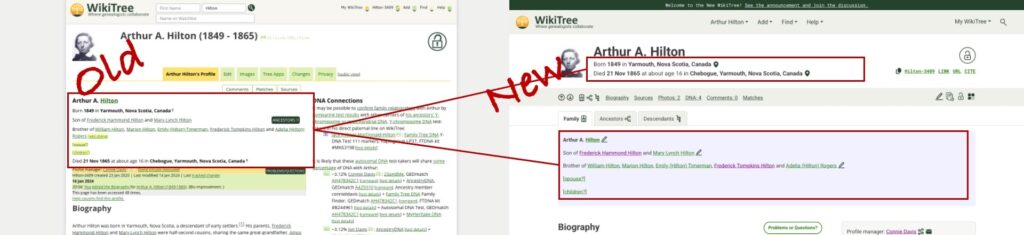
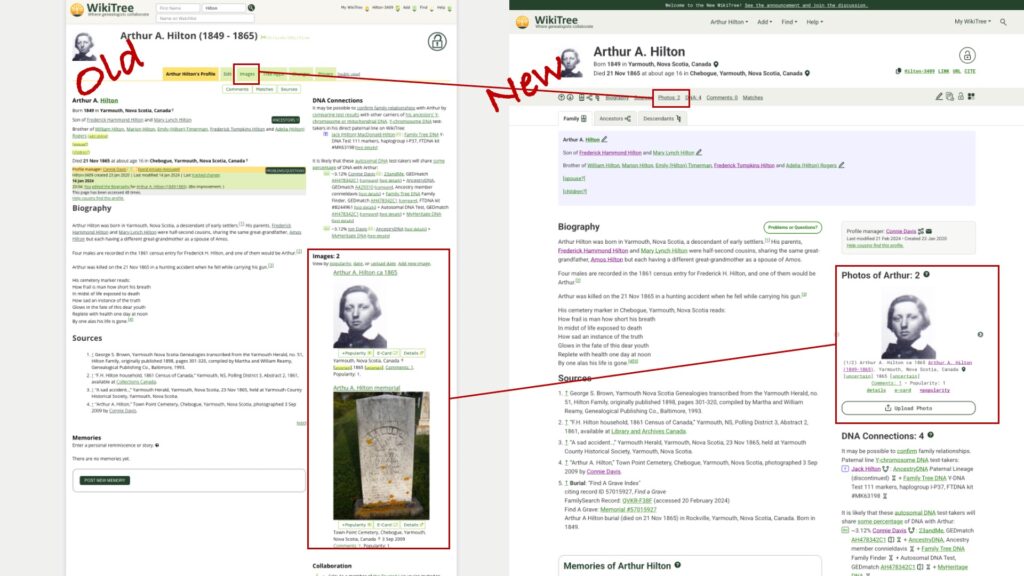
Let’s take a look at some of the updates on the profile of Arthur Hilton. I’m his two-times-great grand-niece. He died young, and he’s one of the people I honour at WikiTree.

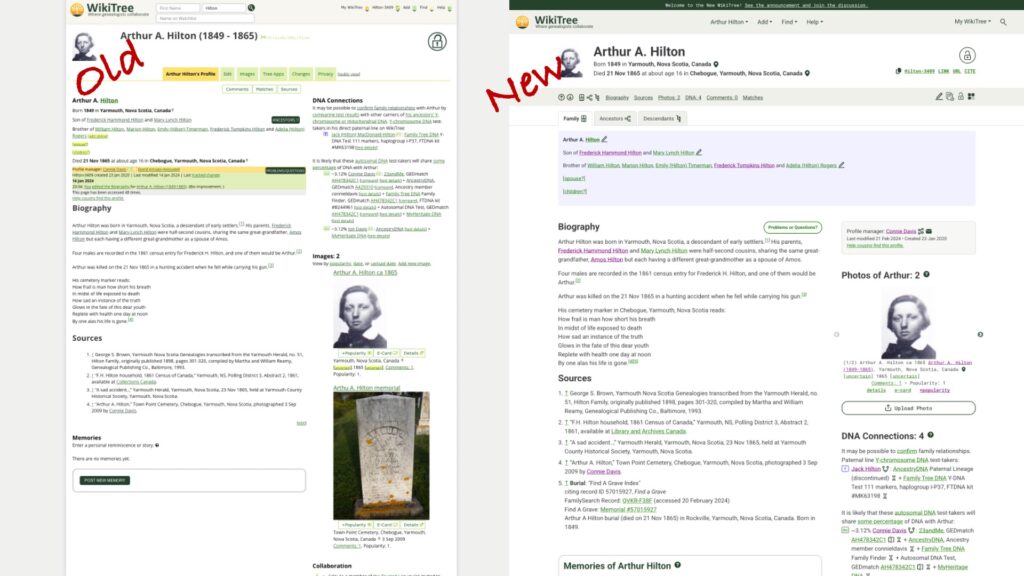
Side-by-side comparison of old and new

The overall look is cleaner and better organized. The huge grey border (a total waste of space) is gone and there’s a better balance between the two columns. The larger font is easier to read and the use of colour makes sense. See that blue box? It’s a visual cue that I’m looking at the profile of a biological male. The hypertext is green and links you have clicked are purple.

Wiki ID and menus

The area for the WikiTree ID and dropdown menus has been streamlined and cleaned up. The menus are more visible with the larger font and the menus themselves contain less clutter. (The menus are not shown here! Click on one and check them out!)

Copyable text options

The visibility of useful copyable text options is perfect! In the old version, they were almost invisible in tiny green font. They are now clearly marked with a new copy icon, familiar from other websites. I use these links when sharing profiles in emails, adding links within profiles, and in my research logs. And if you like to cite WikiTree, you can do that here with one click.

Menu placement and improved icons

Like all good websites, there’s usually more than one way to navigate. This menu in grey background is a redesigned tab menu. It uses icons and text to move commonly used features and actions together. The more experienced WikiTree user wants to access profiles and features quickly without scrolling, and here they are. I’m referring to this as the “Quick Menu.” Well done, design team! I love the simple navigation arrows and ability to jump to the part of the profile I want to see, (including the ancestors and descendants tabs), the “edit” pencil, the profile change history icon, familiar privacy icon (padlock), and the new Tree apps icon.

Key details and relationships

Information that was small and difficult to parse is now separated with better placement in the profile. Key details (birth and death with locations and certainty indicators) now appears immediately below the larger, improved name block. Relationship information is in the shaded block, blue for Arthur, a biological male.

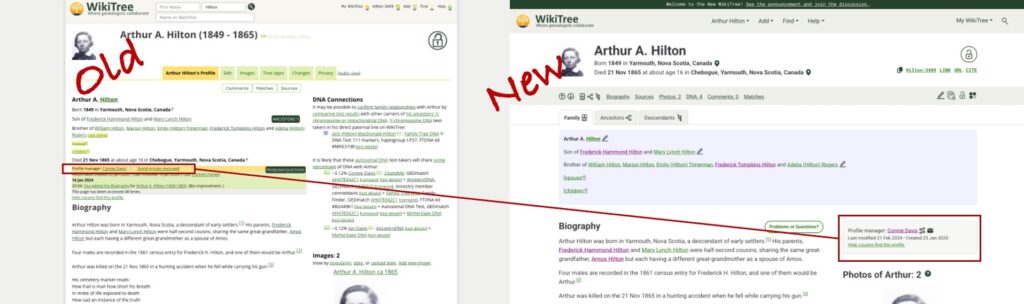
Finding the profile manager is also easier.

The new profile manager section

The profile manager formerly appeared in small font in the crowded area on the left. It now has its own shaded block on the right. In addition to allowing an instant email to the profile manager, there is now a redesigned “connections” icon which allows you to see how the profile manager is connected to the profile. In the past, I needed to go to another part of WikiTree to see this information. Now when I contact a profile manager, I may gain insight of their motivation to create or manage the profile.

The next improvement may be lost on many WikiTreer users.

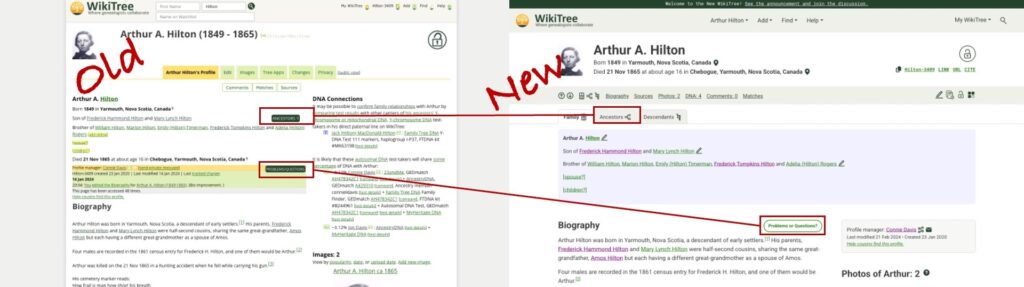
Better placement of Ancestors and Problems/Questions buttons

As part of the Ambassador team at WikiTree and someone who is often demonstrating WikiTree, I appreciate that the Ancestors Button and Problems/Questions buttons are no longer in a similar position with the same design. Note: There would be a descendants button on the “old” version if Arthur had descendants. The new design allows the user to access ancestors or descendants using the icon in the grey Quick Menu bar or using the clearly visible tab.

New Ancestor View

Either option opens a family tree for Arthur, also with an improved look and feel. It features separated colour blocks, cleaner font and icons, and arrows to navigate further back in the tree. The Descendants view has similar improvements.

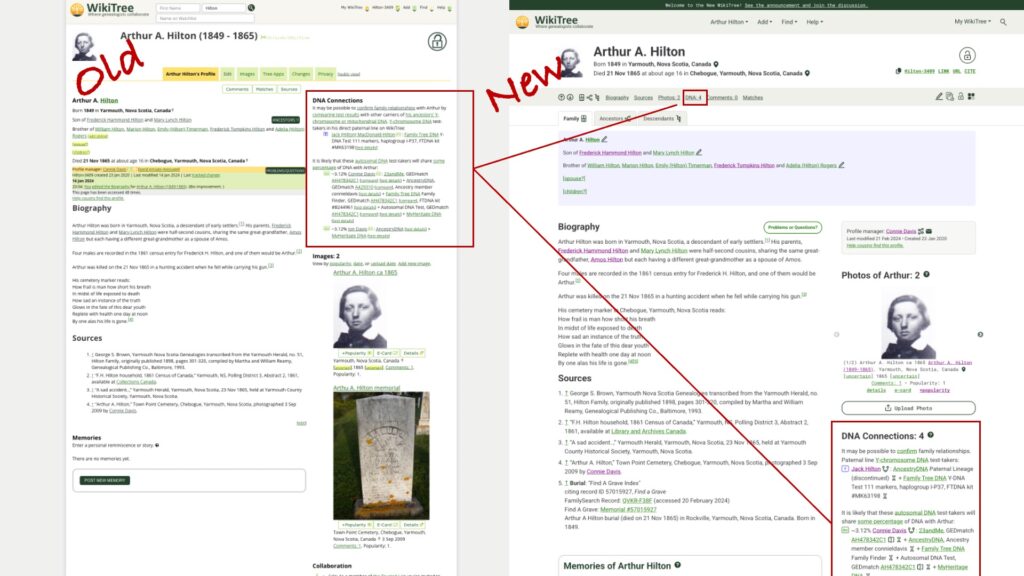
Back on the profile page, it’s time to look at the treatment of DNA in the new profile.

DNA Connections

DNA Connections can now be accessed via the Quick Menu in grey and is found in a familiar location along the right, now below a redesigned photo section. Again, the text block is cleaner, easier to read, and only contains the information it needs to contain.

Images are now Photos

The old images block sometimes made a simple profile like Arthur’s lopsided, with the photos dominating the right side. A new photo block allows you to toggle through the uploaded images using a navigation arrow to the side of each photo. You can also navigate quickly to the “Upload Photos” page, which has also received an update and is cleaner and easier to use. Again, kudos to the Design Team and programmers. They went over this website with a fine-toothed comb!

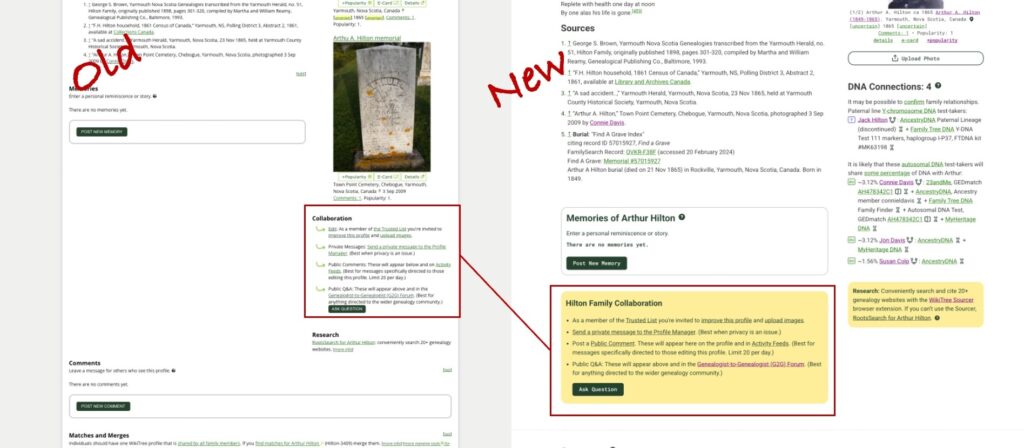
Collaboration stands out

In the past, the use of yellow background wasn’t clear to me. Now yellow highlights collaboration and ongoing research. The collaboration language is friendly and clear. The research block encourages people to check out the incredibly useful WikiTree Sourcer Extension (which works great with the new updates.)

Comments, Matches and Merges, and useful Connection and Relationship Information

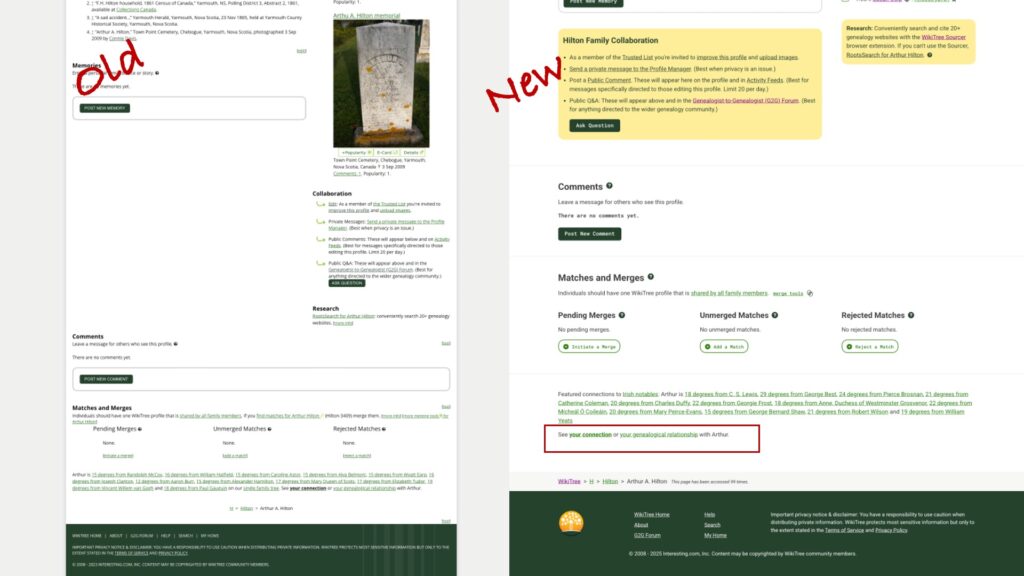
Scrolling down, you can see how the new design makes better use of space – there is not a huge empty block to the left. In profiles with a longer biography, there will be blank space to the smaller right side of the page. The Comments and Match and Merge sections have gotten the cleaner, pithier treatment, and thankfully, the text with “See your connection or your genealogical relationship with Arthur” is now separated from the Featured Connections text.

Even the footer is now easier to read and more pleasing to the eye.

I know this is a tiny glimpse of all that was accomplished with this redesign, and there’s much more I haven’t noticed yet. I look forward to finding the features I’ve missed, and new features that may replace what I’ve shown here.

Well done, WikiTree!

And if you’re new to WikiTree, welcome! Check out the Help links on WikiTree and useful information at the WikiTree YouTube channel.

The year 2022 in blogging

It’s that time of year when people look back to reflect and look forward to wonder. I began the year 2022 with an internal pledge to blog regularly. I set up an every-other-week reminder within my task-management software, Omnifocus for Mac (based on Getting Things Done by David Allen). I exceeded my goal and published 33 blogs here in 2022. I focused on the things I care about:

  • History and Identity
  • Impacts
  • Genetic Genealogy
  • Documentary Research
  • My Family History

In my first post of 2022 I wrote:

I study family history because it forms the foundation of who I am and how I think and act. An understanding of where I come from gives me strength and gives me pause. I have discovered inspiring stories and tragic ones. I have marvelled at the steps my ancestors took (literally) that led to my presence and wondered at their inhumanity. Curiosity and the quest for meaning shape my journey. And sometimes that meaning requires action. The action can be reporting on what I’ve discovered or taking steps to address historical wrongs.

The blog that most clearly captures that theme is this one from February. I expect to continue uncovering and facing my family’s past and sharing it here and on WikiTree.

Throughout the year, there are blog posts telling about new tools, reminders about tried-and-true research approaches, and touching stories encountered during research.

In September I embarked on several journeys. One I wrote about here. I volunteered as a peer group leader for Family Locket’s Research Like a Pro Study Group. Genealogy is good for your brain (another theme of my first blog entry of 2022), and one way I do that is through continuing education. As a peer group leader, I read many other people’s research as well as working on my own. And as is more common than not, it will take several phases of research until I consider the project “done.” (Done in a genealogical sense, meaning that new evidence could lead to a reassessment and new conclusions.)

Another journey took me on a new path. I was invited to join the team at Your DNA Guide. This launched an intense period of getting to know all the amazing offerings at Your DNA Guide and figuring out how I could support the mission: “Strengthening personal identity so people can connect to their families and communities.” I’ve contributed a couple of blog entries (you can find those here and here.) I’ve started coaching students in Your DNA Guide courses. And I’ve taken on project management for the Academy courses. It’s an exciting time in a growing company whose mission I care deeply about.

A third journey is one of friendship. A genealogy joy of 2022 is an ongoing relationship with two genetic genealogy buddies. We have plans. We have dreams. And we have real lives. Some of our plans may come to be, who knows?

So what does all this mean for 2023? I think I’m going to pause that reminder on blogging. I want to write when I feel moved to write. One recent blog was inspired by a new client who is enthusiastic about learning genealogy to face their own family’s history. I continue to be drawn to and repelled by my family’s contribution to colonization and slavery. I expect to continue to share what I learn about that here and on WikiTree. And when new and exciting things come around, I might be inspired to write. But as a task, I don’t think blogging serves me well.

Thanks for being here. And doing what feeds your soul.

FANs and WikiTree

This week, the WikiTree Family News (an optional newsletter for WikiTreers) highlighted a blog by Kathleen Hill Tesluk with the following quote:

Elizabeth Shown Mills reminds us to study in depth each friend, associate, or neighbor our ancestor interacted with in order to learn more about the context of their lives and break down brick walls. WikiTree is the perfect platform to record this information in a convenient place. … it combines the power of analytical narrative with the visualization of a tree.

Kathleen Hill Tesluck, “WikiTree and the FAN Principle,” Voices from a distant past (https://voicesfromadistantpast.blogspot.com/2022/08/wikitree-and-fan-principle.html : accessed 9 August 2022).

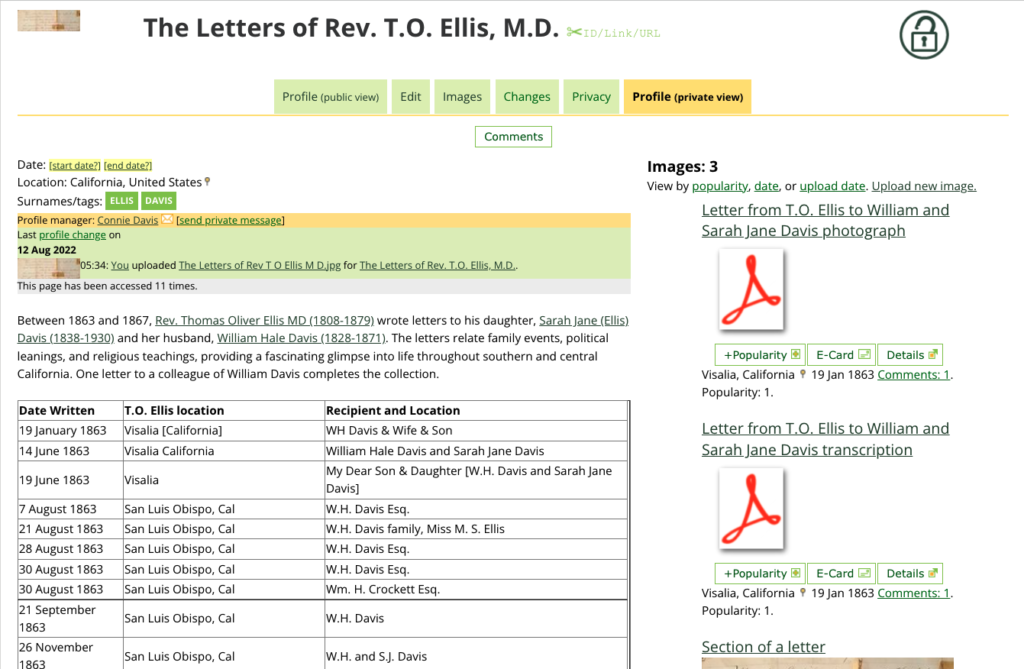
That had my attention right away. I recently started a Free Space Profile (FSP) on WikiTree to share the letters my 3x-great grandfather wrote in the middle 1800’s. Throughout the letters he mentions neighbors and colleagues, particularly from his two chosen fields of endeavour, medicine and religion. (He also farmed, and I suspect his wife Elizabeth kept that going!) As part of my certificate in the University of Washington’s Genealogy and Family History Program, I researched the letters and created a spreadsheet of everyone mentioned and did preliminary research on them. The final result is available here. (Note: This project was written when the Genealogical Proof Standard and Elizabeth Shown Mill’s amazing contributions around citation and evidence were just beginning to take hold.)

Uploading the letters to the FSP will take time, since I need to adjust the images of the letters, turn them into PDFs and review my transcriptions. Creating the FSP gave me the opportunity to learn some new formatting techniques on WikiTree and I am grateful for the opportunity. And thanks to Kathleen’s blog, I can begin to link the people in the letters or his biography to other WikiTree profiles. I connected the first one today, Col. Thomas Baker, who was a California Senator.

I am simultaneously working on upgrading Thomas’ WikiTree profile to Level 3. For more about WikiTree biography standards, check out this post from the Profile Improvement Team.

The power of WikiTree to capture information, share knowledge, and connect people continues to grow.