That new project feeling

Every new project has a honeymoon period. There’s the anticipation of what might be discovered and the pleasure of setting up the project so that the research proceeds smoothly. Here’s a glimpse into my project set-up process.

Research Log

A little over a year ago I started using Airtable as my research log. I have enough understanding of programming to be dangerous. I even took a class in Fortran in college and I learned how to use Microsoft Access when I worked in a health services research setting. I love relational databases even more than I love spreadsheets. Airtable is a “spreadsheet-database hybrid with features of a database but applied to a spreadsheet” according to Wikipedia. Nicole Dyer of Research Like a Pro (RLP) with FamilyLocket has shared terrific bases (templates) in the Airtable Universe. I developed my own adaptations to Nicole’s RLP with DNA Multiple Testers Base.

Below is a screenshot of the documentary research log I use based on Nicole’s template. I’ve grouped this log by surname (4th column), then sorted it by date of event (3rd column) then locality (5th column). Dates are written in YYYY-MM-DD format to sort the records (rows) by a field (column). Place names begin with the two-digit state abbreviation, followed by county, and town. This arrangement also supports sorting without creating multiple fields to sort. And if you are looking at column 8, yes, I do create the citations when I first look at the document. I have a citation template (also in Airtable).
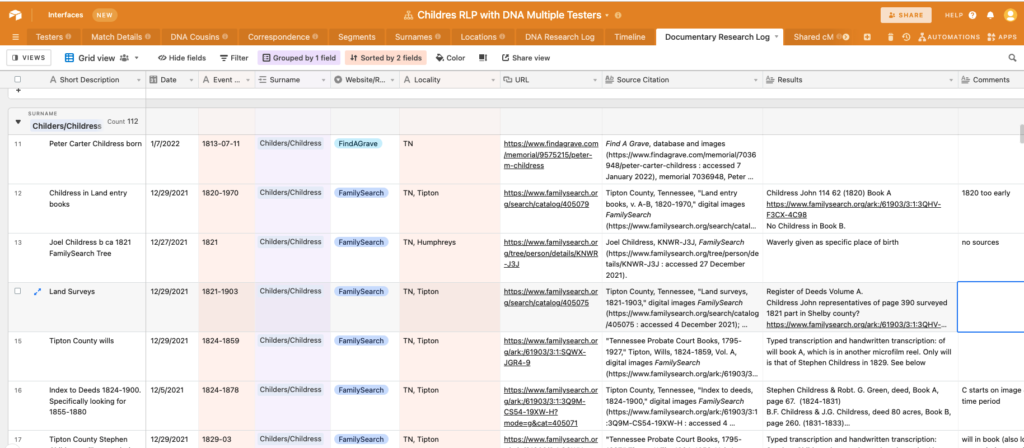
Documentary Research Log in AirTable

Digital Filing

Every project has a folder on my drive which is backed up to Dropbox. The folder organization varies by project. The snapshot below is for my mysterious 2x-great grandmother, Mattie Childress. Each research question has a numbered file. “00-Mattie death date” and “01-Parents for Mattie” are examples. Nested within the folder are sub-folders for phases of research. “Archive” holds prior drafts and will be discarded at the end of a project. “Analysis” contains tables for census or timeline analysis. “Images” has screenshots of diagrams.
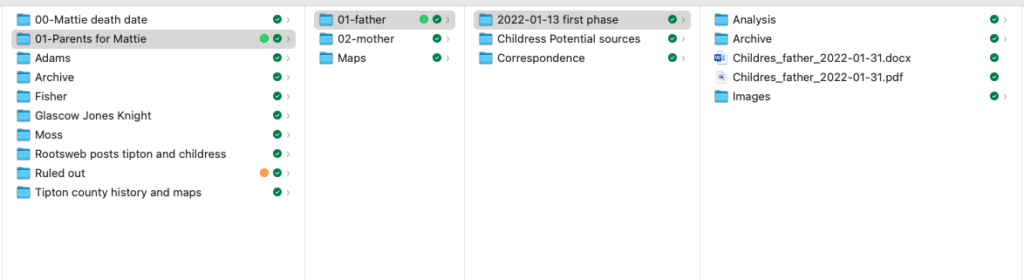
Digital Filing System

I’ve used Google Docs and Sheets and struggle to use the filing system in Google Drive. Many people use them to good results. Using Google docs, sheets and drive allows sharing through links. I get around this by sharing Dropbox folders for large files.

Naming conventions

File names for individual items (documents, images, spreadsheets) have evolved. There are two styles I use consistently: Name of document first or date first. When I am writing a report, the name of the document is written with underscores, then the date, always in YYYY-MM-DD format.

Childres_father_2022-01-31.docx

For sources (scans of originals, downloaded census, birth, marriage, death, etc.) I lead with the date, followed by the last name in caps, then location and type of record. I use dashes between elements of the date in YYYY-MM-DD format. This creates an instant timeline in my folders. Locations are organized from large geographic region to small.

1879-05-08_CHILDRESS_Bill_TN_Tipton_indictment_riot.jpeg

Report template

I set up the project report using a template and “write as I go.” Writing the report while I’m working supports the analysis process and I’m not faced with a blank page at the end. When working on client projects, writing-as-I-go also helps me stay within hourly limits for a project. The template, like naming conventions, has evolved over time. I use a Microsoft Word .dotx file which includes sample paragraphs I often need (such as explaining the usages of different types of DNA tests or how autosomal DNA is used to predict relationships).
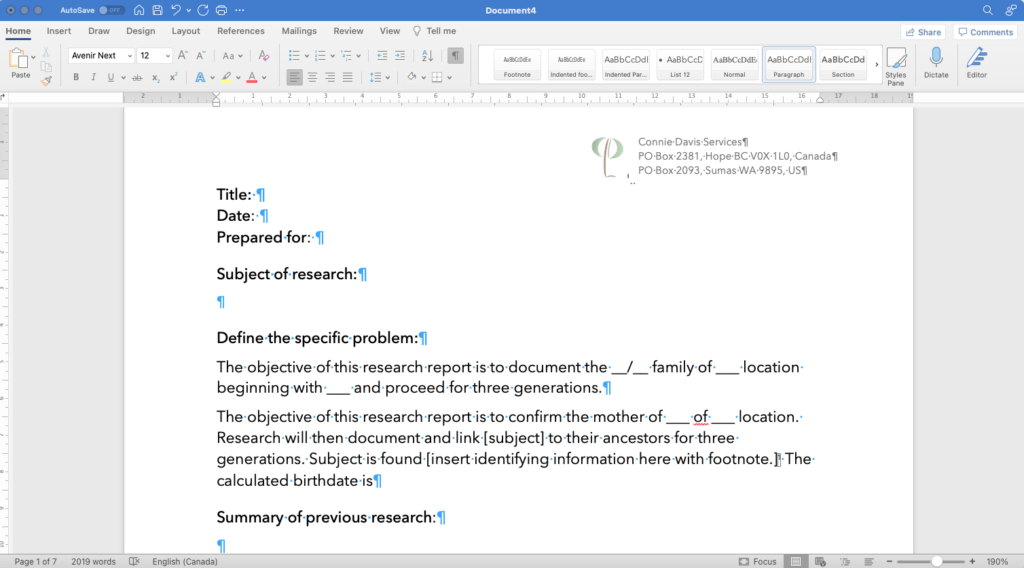
Report template

I started a new project two weeks ago and set it up as described here. I can spend a few minutes or several hours researching knowing that I can focus on the research and analysis. And I’m enjoying the honeymoon!

Getting started with family history research

First, gather what you already know. This could include prior research by yourself or others, existing documents that you hold (marriages, birth certificates, cards, letters, newspaper clippings, family Bibles), and writing down what you and others know (paying attention to dates and places such as homes, schools, cemeteries, relocations).

As you gather information, collect details and note your sources. Genealogists use writing conventions, such as recording dates as 18 September 2019 (that way there is no confusion about which is the month and which is the year). Place names include as much detail as possible (such as Town, County, State) and are recorded as the place was named at the time of the event. For example, some of my ancestors lived in Thomaston, Maine which was in Lincoln County until 1860 when it became part of the newly-formed Knox County. So my ancestor Nathaniel Fales III was born 28 June 1785 in Thomaston, Lincoln County, Maine and died 24 Jan 1876 in Thomaston, Knox County, Maine. The Atlas of Historical Boundaries Project captures boundary changes for states and counties.

For each item of information, write down where you found it. The detail in the citation needs to be enough that anyone can locate that source. It could be “Floyd Workman, interview by Connie Davis, 2 September 2006, notes privately held by interviewer, [address for private use], Hope, British Columbia, 2022,” or “Cyrus Eaton, The History of Thomaston, Rockland, and South Thomaston, ME., 2 volumes, Hallowell: Masters, Smith, and Company, Printers, 1865, reprinted by Courier-Gazette, Inc., 1972, vol. 1, p. 26.” Citations usually appear as footnotes in genealogical writing so that they never become separated from the information they describe.

Citation in genealogy can be incredibly detailed, and the expert on citation is Elizabeth Shown Mills, author of Evidence Explained. Unless you are writing for publication, you won’t need to know all of the details of genealogical citation but do keep track of your sources! Genealogy software programs can capture this information for you. I use Reunion for Mac. All online genealogy websites can capture sources as well. Without being able to review the citations, it’s hard to evaluate the evidence.

What’s this about evidence? Family history may appear to have facts, such as where people were born and when, but each piece of information must be taken into consideration with other pieces of information. For example, on my grandparent’s marriage certificate my grandmother’s age is recorded as 20 and my grandfather’s age is recorded as 22.[1] Their birth certificates tell a different story. My grandmother was 20, as she was born on 24 October 1910 but my grandfather was 19.[2] My grandmother explained that she was embarrassed to be older than my grandfather so he lied about his age!

Second, be clear about your goal. What do you want to accomplish? If your goal is to build your family tree, consider that each of us have thirty-two 3x great-grandparents, and to build our tree back that far may require researching their siblings and many of our cousins. The best strategy is to start with yourself and work backwards. Fill in the details on key dates and places (birth, marriage, death). If you are interested in context and stories, research their education, occupations, military service, and relocations.

Write down a specific question you want to answer. It might be “Did my 6x great-grandfather Nathaniel Fales II born 25 October 1752 in Norwich, New London County, Connecticut Colony, British Colonial America, serve in the Revolutionary War?” or “When did my 2x great-grandfather, Samuel Dare, immigrate to the United States, eventually ending up in Deer Ridge, Lewis County,  Missouri, at the time of the 1860 census based on his stated birthplace of England?” A focused question will keep you on track and increase your chance of answering your question.

There are many websites that provide wonderful detail to guide you. One of the best is from the National Genealogical Society, How to Build a Family Tree.

Another great free source for all things family history is the FamilySearch Wiki.


[1] Fresno County, California, marriage certificate, Walton L. Davis-Edna L. Workman, 15 April 1931, George Brewster, Minister, Christian Church, Fresno.

[2] Missouri Department of Health, birth certificate, state file number 49675, (24 October 1910), Edna Leona Workman; Bureau of Vital Statistics, Jefferson; certified copy in researcher’s files.

California Department of Public Health, birth certificate, local registrar number 329, 15 June 1911, Walton Leslie Davis; Vital Statistics, Sacramento.